
The difference at a glance
The simplest distinction is:
Quote
Before agreement or work
Shows the proposed products, services, prices and terms.
Invoice
When payment is requested
Shows what the client owes and when payment is due.
Receipt
After payment
Confirms that payment has been received.
A quote is not normally a request for payment, and an invoice is not proof that payment has been received.
What is a quote?
A quote sets out the price and terms you are offering before the client confirms the work or purchase.
A quote may include:
- your business details
- the client’s details
- a quote number
- the issue date
- a valid-until date
- descriptions of the products or services
- quantities and prices
- applicable tax
- the proposed total
- terms or notes.
The client can review the quote before deciding whether to proceed.
A quote may change if the scope, quantities, prices or terms change before agreement.
Make the validity period clear
A valid-until date helps the client understand how long the quoted price and terms remain available.
What is an invoice?
An invoice is a request for payment for products or services supplied or agreed.
An invoice usually includes:
- your business details
- the client’s details
- a unique invoice number
- the invoice date
- a payment due date
- descriptions of the products or services
- quantities and prices
- applicable tax and discounts
- the final amount due
- payment details and terms.
The invoice should make it clear what the client owes, what the charge covers and how to pay.
An invoice is not proof of payment
An invoice records the amount requested. It does not confirm that the client has paid.
What is a receipt?
A receipt confirms that payment has been received.
A receipt may include:
- your business details
- the customer’s details
- a receipt number
- the payment date
- what the payment covered
- the amount paid
- applicable tax
- the payment method
- a reference to the original invoice.
A receipt gives the customer a record of the completed payment.
Use a receipt after payment
Do not use a receipt to request money that has not yet been paid.
How the three documents work together
A typical transaction may follow this sequence:
- QuoteYou propose the work, price and terms.
- InvoiceYou request payment after the work or sale is agreed.
- ReceiptYou confirm payment after the money is received.
Not every transaction needs all three documents.
A simple sale may require only an invoice and receipt. Some businesses may issue an invoice without first creating a formal quote.
Can a quote become an invoice?
Yes. Once the client accepts the quote, the agreed details can be used to create an invoice.
Before sending the invoice, check:
- the client details
- the products or services
- quantities and prices
- tax
- discounts
- the invoice date
- the payment due date
- payment details.
The invoice should reflect the final agreement. Update anything that changed after the quote was created.
IRQDocs Pro can convert a saved quote into an invoice without retyping the client details and line items.
Review before sending
Conversion saves retyping, but you should still check the new invoice before sending it.
Can an invoice become a receipt?
Yes. After payment is received, the invoice details can be used as the starting point for a receipt.
Before sending the receipt, check:
- the payment date
- the amount paid
- the payment method or reference, where relevant
- the customer details
- the receipt number
- any tax information.
A receipt should confirm what was actually paid. It should not show an unpaid amount as though payment has been completed.
IRQDocs Pro can convert a saved invoice into a receipt without retyping the client details and line items.
Confirm the payment first
Create the receipt only after you have confirmed that the payment was received.
Which document should I use?
Choose the document that matches the current stage of the transaction.
Use a quote when:
- the price is still being proposed
- the client has not yet confirmed the work or purchase
- the scope or terms may still change
- the client needs a written estimate before deciding.
Use an invoice when:
- payment is being requested
- the work or sale has been agreed
- the client needs a clear amount and due date
- you need a record of the charge.
Use a receipt when:
- payment has been received
- the customer needs proof of payment
- you need a record of the completed payment.
The exact documents you need may also depend on local tax, legal or record-keeping requirements.
Common points of confusion
Is a quote the same as an invoice?
No. A quote proposes a price and terms. An invoice requests payment.
Is an invoice the same as a receipt?
No. An invoice shows what is owed. A receipt confirms what was paid.
Can I send an invoice before completing the work?
That depends on the agreement. Some businesses request deposits or advance payment, while others invoice after the work is completed.
Does every invoice need a receipt?
Not necessarily. Whether a receipt is needed may depend on the transaction, the customer and local requirements.
Can the document number stay the same after conversion?
Use a numbering approach that keeps each document identifiable and consistent with your records.
Check local requirements
Document and record-keeping requirements vary. Check the rules that apply to your business and location.
Create the right document in IRQDocs
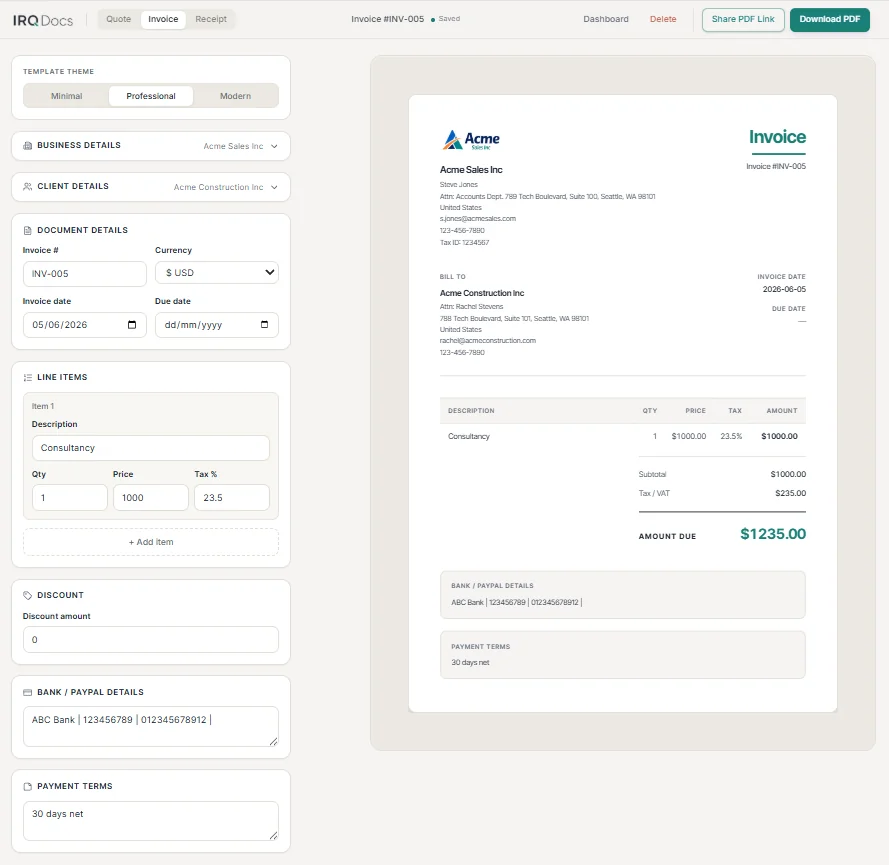
IRQDocs lets you create an invoice, quote or receipt from the same editor.
You can:
- add business and client details
- enter line items, prices, tax and discounts
- check the live preview
- choose a template theme
- download an A4 PDF
- sign in to save documents and create read-only share links.
No account is needed to create, preview or download a document.
Signed-in users can save their work, reuse details and return to documents through the dashboard.
You can also start from the quote template, the invoice template or the receipt template.