
Your business details
Identify the business issuing the invoice.
Include the details that are relevant to you, such as:
- business or trading name
- contact name
- business address
- country
- email address
- phone number
- Tax ID, VAT number, ABN or another applicable identifier
- business logo, if used.
The business name should match the identity your client recognises and the records you use for payment and tax purposes.
Your client’s details
Show who is responsible for paying the invoice.
For a business client, this may include:
- business name
- contact name
- billing address
- country
- email address
- phone number.
For an individual, include the person’s full name and the contact or billing details required for your records.
Check the billing contact
When a client has several contacts or locations, confirm which person or address should receive the invoice.
A unique invoice number
Give every invoice a unique reference.
A clear numbering system helps you and your client identify the document, track payments and find the invoice later.
Examples:
Example invoice numbers
INV-0012026-001CLIENT-104Choose a system you can continue using consistently. Avoid reusing the same number for different invoices.
Invoice and payment dates
Invoice date
Include the date the invoice was issued.
Payment due date
Where payment is not due immediately, also include a clear due date.
Supply date
Depending on your circumstances, you may also need to record the date the goods or services were supplied.
The dates help the client understand when the invoice was created, when payment is expected and whether the invoice is overdue.
A clear description of what you supplied
Describe the goods, work or services clearly enough for the client to recognise the charge.
Use specific wording.
Clearer
Website design and setup
Less clear
Work completed
Where useful, include a project name, service period, product reference or short explanation of the work completed.
Quantities and prices
Show how the charge was calculated.
For each line item, include:
- quantity or number of units
- price per unit
- line-item total.
For work charged as one fixed amount, the quantity may simply be one.
If you charge by time, state the number of hours or days and the relevant rate.
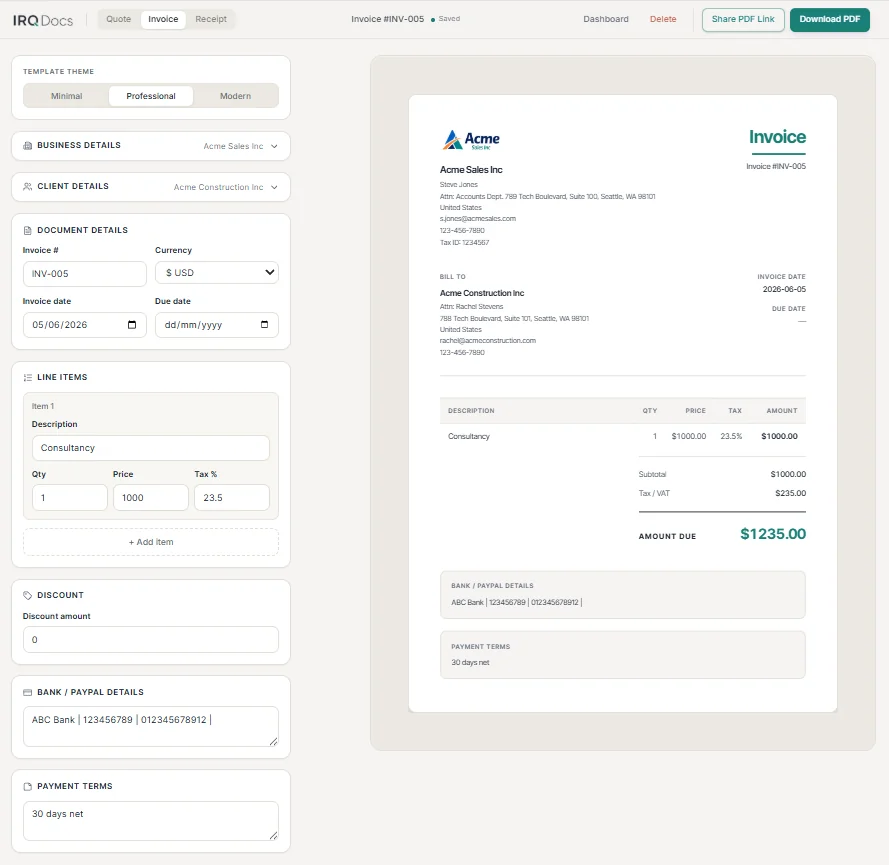
Tax information
Show any tax that applies to the invoice.
Depending on your location and tax status, this may include:
- the tax rate
- tax applied to each line item
- total tax charged
- your tax-registration number
- wording required for tax-exempt or special transactions.
Check the rules that apply
Tax requirements vary by country, business type and transaction. Check the rules that apply to your business.
Discounts
Show any discount separately so the client can see how it affects the amount due.
A discount may be:
- a fixed amount
- an agreed reduction
- a credit applied to the invoice.
Make sure the discount and final total match the terms agreed with the client.
The total amount due
Make the final amount clear and easy to find.
Where relevant, show:
- subtotal before tax
- discount
- tax total
- final amount due
- currency.
Check the calculation
Review quantities, prices, tax, discounts and the final total before sending the invoice.
Payment details and terms
Tell the client how to pay and when payment is expected.
Payment information may include:
- bank account details
- payment reference
- accepted payment method
- payment deadline
- deposit or instalment details
- agreed payment terms.
Only include information the client needs to make the payment.
Protect sensitive information
Avoid placing sensitive information on an invoice unless it is necessary for payment.
Useful notes and references
Use the notes or terms section for information that helps the client process or understand the invoice.
This might include:
- purchase order number
- project reference
- service period
- agreed terms
- contact instructions
- a short thank-you note.
Keep notes concise. Important payment information should not be buried inside a long paragraph.
Check local requirements
Invoice requirements are not identical everywhere.
Your obligations may depend on:
- the country where your business operates
- where your client is located
- whether you are registered for tax
- what you supplied
- whether the client is a business or individual
- the currency and value of the transaction.
This guide is general information
This checklist is not legal, tax or accounting advice. Check the requirements that apply to your business and location.
Invoice checklist
A quick summary you can use before sending the invoice. For a step-by-step walkthrough, see how to create an invoice.
- business details
- client details
- unique invoice number
- invoice date
- payment due date
- clear line-item descriptions
- quantities and prices
- applicable tax
- discounts
- subtotal and final amount due
- currency
- payment details and terms
- useful references or notes.

When you are ready, use the IRQDocs invoice template as a starting point.